• Skip to primary navigation
  • Skip to main content
  • Skip to primary sidebar
  • Skip to footer
Free Consultation
1300 887 889

PowerbITs

Making Technology Work For You

  • About
  • Managed IT Services
    • Network Security
    • Backup
    • Office Relocation
    • Mobile Device Management
  • Cyber Security
  • Business Process Automation
  • Contact

Office 365 – how to check your mailbox usage

Posted on February 19, 2014

  1. Login to Office 365
  2. Open Outlook
  3. Click Menu (gear icon) > Options

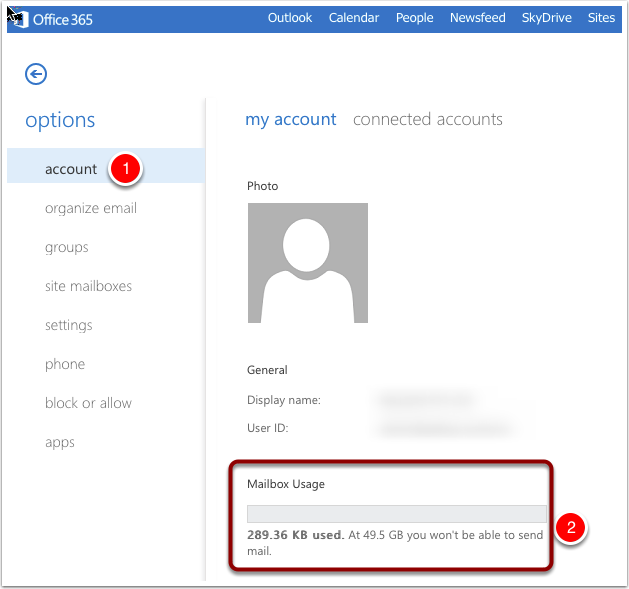
  1. Select options – account
  2. Mailbox usage is displayed

Filed Under: Uncategorized

Primary Sidebar

Recent Posts

How Software Licence Scams Trap Modern Businesses

How Outlook Priority View Is Changing Email Management

Windows 11’s New Update Extends Laptop Battery Life Smartly

AI Hype vs Reality: How Smart Businesses Stay Ahead

When AI Turns Risky: The Hidden Threat of Shadow AI

Footer

Menu

  • About
  • IT Service Plan
  • Managed IT Services
  • Cyber Security
  • Backup
  • Office Relocation
  • Mobile Device Management
  • How It Works
  • Blog
  • Contact

Contact Us

1300 887 889
Suite 201,
14-16 Suakin Street,
Pymble,
NSW 2073

How to Keep Your Data Secure

  • Get the seven things you must do to keep your business data secure...

© 2019 PowerbITs | Website by Website Love